Aruba ED Card for Families: A Complete Guide to Registering Multiple Passengers
When a family travels to Aruba, registration can be completed on a single application to expedite the process. However, each traveler—including children and infants—must have their own approved ED Card and individual QR code. Registering everyone together reduces errors and simplifies the process.
Register my family nowHow does the Aruba ED Card work for groups and families?
When several people travel together, one of the most frequent questions is whether you need only one ED Card or several.
The system works like this:
- Each traveler needs an individual ED Card
- Children and babies must also be registered
- Each passenger receives their individual confirmation.
- Registration can be done within the same application
This allows families to complete the process in a more organized way without having to repeat the form from scratch for each person.
In our system you can register multiple travelers in a single application and our team reviews each form individually to avoid common errors in family trips.
ED Card requirements when traveling with children
All travelers entering Aruba must complete the ED Card regardless of their age.
Minors
Minors must have their own approved ED Card, although registration is usually done by the parent or guardian.
This involves:
- Adding the minor as a passenger
- Entering their details exactly as they appear in their passport
- Include your information within the family application
Infants and Toddlers
Even babies must be registered individually.
This means that:
- They must be added as travelers
- They need their own approval
- They must be included in the family group application.
The immigration system considers each person as an individual entry into the country.
How to Complete the Multi-Passenger ED Card Correctly
Completing a family application is usually quick if you have all the travelers' documents ready.
Enter the details of the first traveler
First, you must complete the main passenger's details:
- Name exactly as it appears on the passport
- Date of birth
- Nationality
- Passport number
It is important not to enter data from memory and always copy directly from the document
Add more members of your family
You can then add more passengers within the same request.
You can include:
- Children
- Babies
- Partner
- Other relatives
Each traveler will have their own individual registration even though the process is completed together.
Our system allows you to manage multiple passengers in a single request to avoid repeating the manual process.
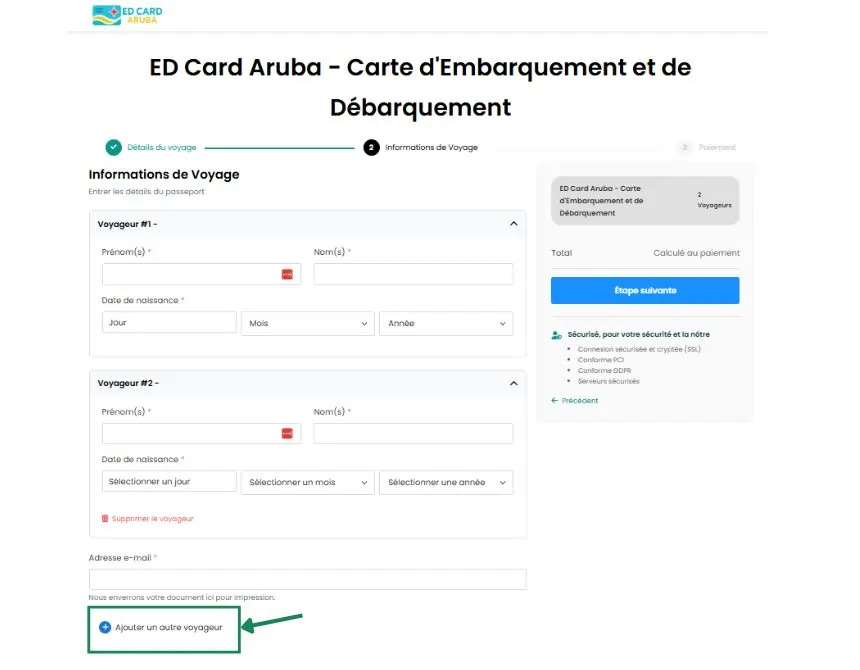
Enter your contact email address
You only need one contact email address. Each child does not need their own.
In that email you will receive:
- Confirmations
- Approvals
- QR codes for all travelers
Complete the trip details
The form also requests:
- Flight arriving in Aruba
- Arrival Date
- Accommodation Address
- Trip Length
A common mistake for families is entering the departure flight or a connecting flight instead of the arrival flight
Pre-shipment review
One of the biggest risks in family applications is that an error in a single passenger will force the process to be repeated.
Therefore, our process includes:
- Review of names and passports
- Date verification
- Trip data validation
- Contact us if we detect inconsistencies
Payments and costs when registering a family ED Card
Each traveler needs their own ED Card, so registration is processed individually even if completed as a group.
When multiple passengers are checked in:
- The system allows you to manage everything in a single request.
- Payments are processed per traveler
- A single payment can be made for the entire group.
Our service includes:
- Pre-form review
- Support during the process
- Shipment management within the official timeframe
Quick checklist before sending a family ED Card
Before submitting your application, please check the following:
- Names identical to passport
- Correct passport number
- Correct date of birth
- Flight to Aruba is on schedule
- Correct address of accommodation
- Well-written email
This review usually prevents most errors in family applications.
Don't risk your entry to Aruba over a form error.
Get personalized help to complete your ED Card correctly.
Frequently Asked Questions about the ED Card for Families
- Review the information
- Detect errors
- Schedule the shipment at the right time
- Name
- Passport number
- Date of birth